C++ Project Design Workshop: Part 2
During March and April of this year, I coordinated and taught a C++ Project Design workshop at Bergen Community College. This serves as an introduction to programming in C++, as well as some introduction to Linux and software development ideologies, such as Agile.
This was a four-part workshop, each lesson an hour long.
This post contains the second lesson of the workshop.
Workshop Outline
- Setup
- Programming fundamentals (today!)
- Project introduction
- Software methodologies
Today’s Outline
- What is C++?
- Install G++ (or GCC)
- Anatomy of a C++ program
- Variables
- Data types
- Operators
- Conditionals
What is C++?

^ This is Keith, the unofficial mascot of C++.
C++ is a procedural programming language, based on C. It’s an extension of the C programming language. There has been object-oriented (OOP) and functional features added to the language since the mid-1980s. You’ve probably heard of it being popular in video game development and embedded systems!
Side Note: Procedural vs. Functional PLs
- Procedural relies on step-by-step instructions to change the state of the program in which data is mutable (can be changed)
- C, C++, Python, Java
- Functional takes after mathematical functions (same output for same input) in which data is immutable (cannot be changed)
- Haskell, OCaml (impure)
Install G++ 🐃
g++ --version # Check if it's already installed!
sudo apt install build-essential
For MacOS users, you will likely need to install GCC.
brew install gcc
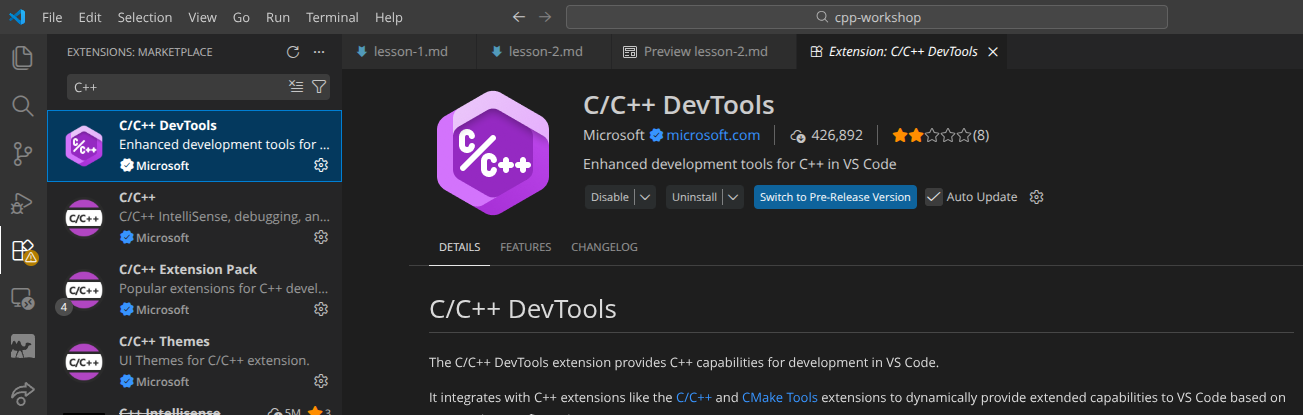
Install the C++ Extensions on VS Code
- Open VS Code
- Select the Extensions view and search for
C++ - Install the extensions
Anatomy of a C++ Program
- Preprocessor directives
using namespace std;- The program will access entities whose names are part of the namespace
std(“standard”)
- The program will access entities whose names are part of the namespace
main()
#include <iostream> // Preprocessor directive
using namespace std;

int main() { // Starting point of the program
    cout << "Hello world!";
    return 0;
}
Interacting with our C++ Programs: cout, cin, endl
The iostream library handles input and output. The common objects are:
cout(“character output”) is used with the insertion operator (<<) to send output to the consolecin(“character input”) is used with the extraction operator (>>) to put input from the console in a variableendl(“end line”) outputs a newline (and flushes the buffer), though\nis preferred
#include <iostream>
using namespace std;

int main() {
    cout << "Enter a number: "; // Waits for input by the user
    int x = 0;
    cin >> x;
    cout << "You entered " << x << '\n';

    return 0;
}
Variables
A variable is a named location in RAM. Think of it as a bucket where you can store a value.
- Variables must be defined before it can be used, where its type and name must be specified.
- Data types include:
char= 1 byteshort= 2 bytesfloat,long= 4 bytesdouble= 8 bytes
Declaring and Assigning Variables
- The syntax for declaration is:
<DataType> <variableName>; - The syntax for assignment is:
<variable name> = <expression>;
#include <iostream>
using namespace std;

int main() {
    int number; // Variable declaration
    number = 5; // = is an assignment operator; number now holds the value 5

    int width, length = 5; // width is declared, but not initialized. length is initialized.
}
Variable Initialization
Variable initialization is assigning a variable a value at the time it’s defined. There are 3 ways to do this:
- Functional notation
- Brace notation
- Copy initialization (most common)
int value(5); // (1)
int value{5}; // (2)
int value = 5; // (3)
More Variable Terminology!
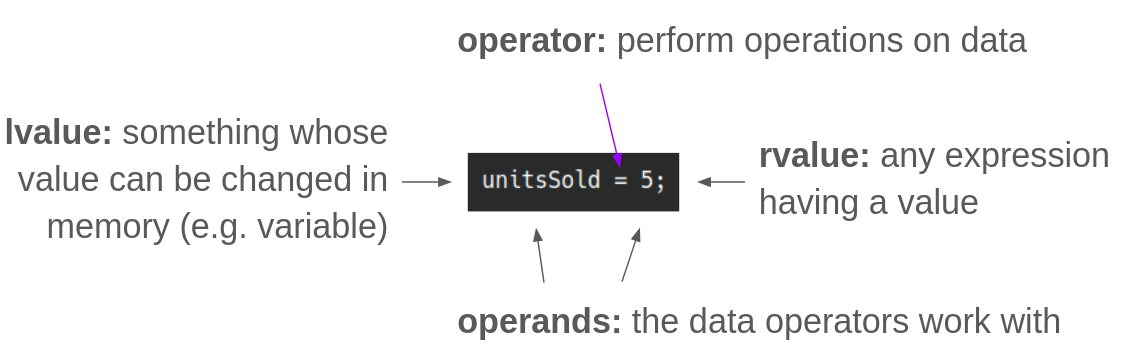
Variable names are typically written in camelCase.
Constant Variables
Constant variables are read-only and can’t be changed later in the program. These must be initialized when defined.
The syntax: const <DataType> <VARIABLE_NAME> = <exp>;
The convention is to write constant variable names in all CAPITAL_LETTERS.
const double INTEREST_RATE = 0.069;
Try: Initializing and Displaying Variables
Task: Initialize an integer variable (give it any name) and give it any value. Then, display the variable back to the user.
To compile and and generate an executable: g++ main.cpp -o main
Then, run the executable with ./main
Note: Try using Git! Create another repo for these exercises with mkdir exercises. Initialize your local repo with git init -b main. If you want to push it to GitHub, create a new empty repo on GH and copy the remote repo URL (SSH). In your terminal, git remote add origin <URL> and then push your commits.
Bad Practice: Multiple Assignment (·•᷄ࡇ•᷅ )
a = b = c = d = 12;
Primary Data Types
Numeric
- Integer (whole numbers)
int= 4 bytesunsigned int= 4 byteschar= 1 byte- Stored in memory as integers
- Must be enclosed in
'' - Corresponds to an ASCII value, where
A = 65anda = 97
- Floating-point
float= 4 bytesdouble= 8 bytes- By default, are displayed with 6 significant digits
- When assigned to an integer variable, the part after the decimal gets truncated (cut off)
bool- Allows you to create values that hold true (1) or false (0) values
string- Not built-in; must
#include <string> - A null terminator
\0is automatically placed at the end of string literals - When comparing string objects, the ASCII values of the characters making up each string are being compared
- Not built-in; must
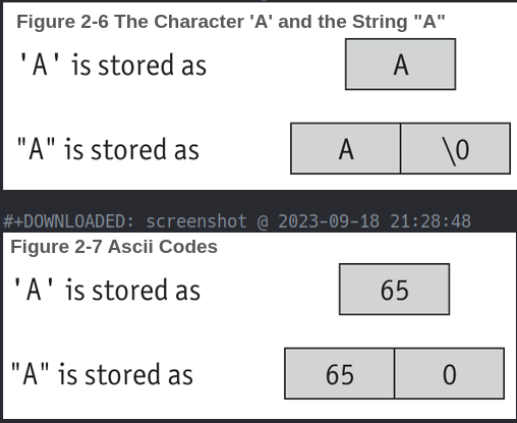
^ From “Starting Out with C++: Early Objects” (10th Ed.) by Tony Gaddis, Judy Walters, and Godfrey Muganda
Operators
Arithmetic Operators
| Operator | Definition | Example |
|---|---|---|
| + | Addition | x = x + 1; |
| - | Subtraction | x = 10 - y; |
| * | Multiplication | z = x * y; |
| / | Division | z = 10 / x; |
| % | Modulo | z = 10 % 3; |
| ++ | Increment | z++ |
| – | Decrement | --y |
Try: Using Arithmetic Operators
Task: Create 2 variables x and y. Initialize them to be 12.3 and 67, respectively. Perform three arithmetic operations with x and y, assigning each of the results to their own variables. Display the three results in the console.
Solution
#include <iostream>
using namespace std;

int main() {
    float x = 12.3;
    int y = 67;
    float sum, difference, product;

    sum = x + y;
    difference = y - x;
    product = x * y;

    cout << "The sum is: " << sum << "\n";
    cout << "The difference is: " << difference << "\n";
    cout << "The product is: " << product << "\n";

    return 0;
}
Combined Assignment Operators
| Operator | Example |
|---|---|
| += | x += 5; instead of x = x + 5; |
| -= | y -= 2; |
| *= | z *= 10; |
| /= | a /= b; |
| %= | c %= 3; |
Relational Operators
| Operator | Definition |
|---|---|
== | Equal to |
!= | Not equal to |
> | Greater than |
< | Less than |
>= | Greater than or equal to |
<= | Less than or equal to |
Logical Operators
Logical operators connect 2 or more relational expressions into 1.
| Operator | Meaning | Effect |
|---|---|---|
&& | AND | Both must be true for the expression to be true |
|| | OR | One or both expressions must be true for the expression to be true |
! | NOT | Makes a true expression false and a false expression true |
Precedence
!&&||
Examples
if ((temperature < 20) && (minutes > 12)) {
    cout << "The temperature is in the danger zone.";
}

if (moreData == true) {
    cout << "Do cool stuff!";
}
Conditionals
if Statement
The if statement is a control structure. When the condition is true (or false), certain statements are executed.
if (expression) {
    // Code here
}
Can be written without the {} if only 1 line is going to be conditionally executed.
#include <iostream>
using namespace std;

int main() {
    int score1, score2, score3;
    double average;

    cout << "Enter 3 test scores and I will average them: ";
    cin >> score1 >> score2 >> score3;

    average = (score1 + score2 + score3) / 3.0;
    cout << "Your average is " << average << endl;

    if (average == 100) {
        cout << "Congrats! That's a perfect score!" <<< endl;
    }

    return 0;
}
if-else
The else block is run when the conditional statement is false.
if (expression) {
    // These statements run if the expression is true
}
else {
    // These statements run if the expression is false
}
if-else if
if (expression) {
    // These statements run if the expression is true
}
else if (expression) {
    // These statements run if the expression is true
}
else {
    // Statements run if all of the above expressions are false
}
Try: Write an if-else
Task: Take an integer input from the user and then display if the number is odd or even.
Solution
#include <iostream>
using namespace std;

int main() {
    int num;
    cout << "Enter an integer: ";
    cin >> num;

    if (num % 2 == 0) {
        cout << num << " is even." << endl;
    }
    else {
        cout << num << " is odd." << endl;
    }
}